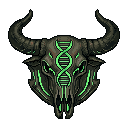
Hello, Mutarch currently has 45 species in the unit catalog, a hatchery that will produce an unbounded stream of individuals over a long run, and exactly one person on the art team, who cannot draw. This post is about how every one of those individuals gets a face anyway.
One portrait per species is a warehouse
The straightforward options were both bad. Commissioning hand-drawn variants per species was out on cost and iteration speed alone: every time a species gets redesigned (which in this game is a core mechanic, not an accident), the variants would all need redrawing. The other option, one static portrait per species, I actually shipped for months. It made the colony screen read like a warehouse inventory. Six skitters in a clan were six copies of the same PNG, and the game kept insisting these were individuals with names, deeds, and genetic variance while showing you a row of clones.
So the pipeline is two-stage. Stage one: AI-generated base pixel art, one portrait per
species, produced through PixelLab and wired into the repo by a pile of scripts (more on that
below, including the part where it fails). Stage two: a runtime compositor in
src/ui/portraits/ that turns one base PNG into as many visually distinct individuals as the
game needs, deterministically, from nothing but the unit id.

The compositor
The whole thing lives in src/ui/portraits/portraitCompose.ts and is built from three parts:
a seed, a recolor, and scars.
The seed is the boring part, and it is boring on purpose. The unit id goes through FNV-1a
(initial state 0x811c9dc5, multiplier 0x01000193) into mulberry32, the same tiny PRNG
that runs the rest of the game. This is the UI-side twin of the seeded streams from devlog #3:
no Math.random anywhere, so the same unit bakes the same face on every reload, every
machine, forever.
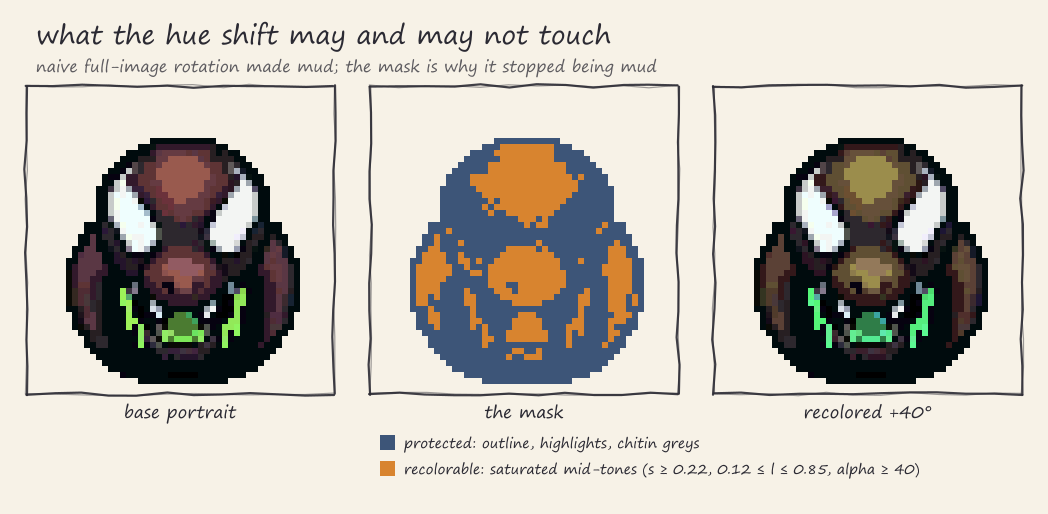
The recolor is where I got it wrong first. Version one rotated the hue of every pixel in the portrait. The result was mud. Rotate a whole sprite 40 degrees and the near-black outline picks up a color cast, the white eye highlights go pastel, and the desaturated chitin greys turn into a sickly tint that reads as a compression artifact, not an individual. The sprite stopped looking like a different skitter and started looking like a broken texture.
The fix is a mask. The recolor (hue shift plus saturation and lightness ramps) only touches pixels that are saturated mid-tones: anything with saturation under 0.22 is skipped, anything with lightness under 0.12 or over 0.85 is skipped, and anything with alpha under 40 is skipped. That protects the outline, the highlights, and the greys, and shifts only the accent color of the creature. The result reads as a different individual of the same species, which is exactly the sentence I needed the pixels to say.
Scars are decals from a small atlas: a pool of 6 generic healed scars (slash, claw,
crack, bite, burn, acid) plus 2 special ones, a fresh gash and a stitch seam.
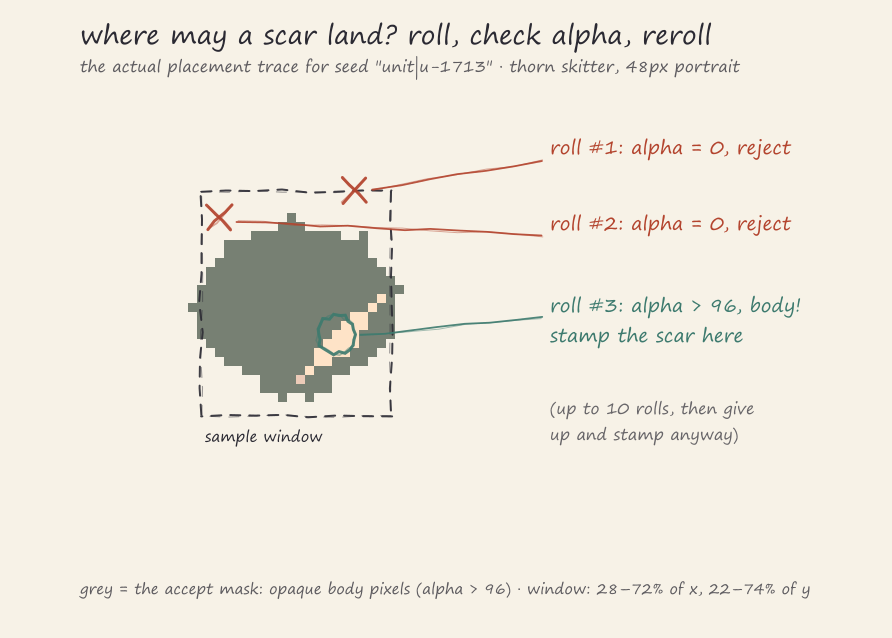
Placing them is the part I am fondest of, because the dumb solution is a one-line bug: roll a
random x and y, and sooner or later a scar floats in the transparent air next to the
creature’s head, which reads as a rendering bug rather than a wound.
The actual placement is rejection sampling. Roll a point in the central region of the sprite (28 to 72 percent of the width, 22 to 74 percent of the height), check the alpha channel at that pixel, and keep the point only if alpha is above 96, meaning it landed on actual body. Otherwise reroll, up to 10 attempts. After 10 misses it places the scar at the last point anyway, on the theory that if you miss the body ten times in a row, the sprite is mostly transparent and we have bigger problems than scar placement.
Each composed portrait is baked to a canvas once, cached as a data URL keyed by the full recipe, and deduplicated while in flight so React rendering twice does not bake twice. Same id in, same pixels out, across reloads.
Color distance encodes importance
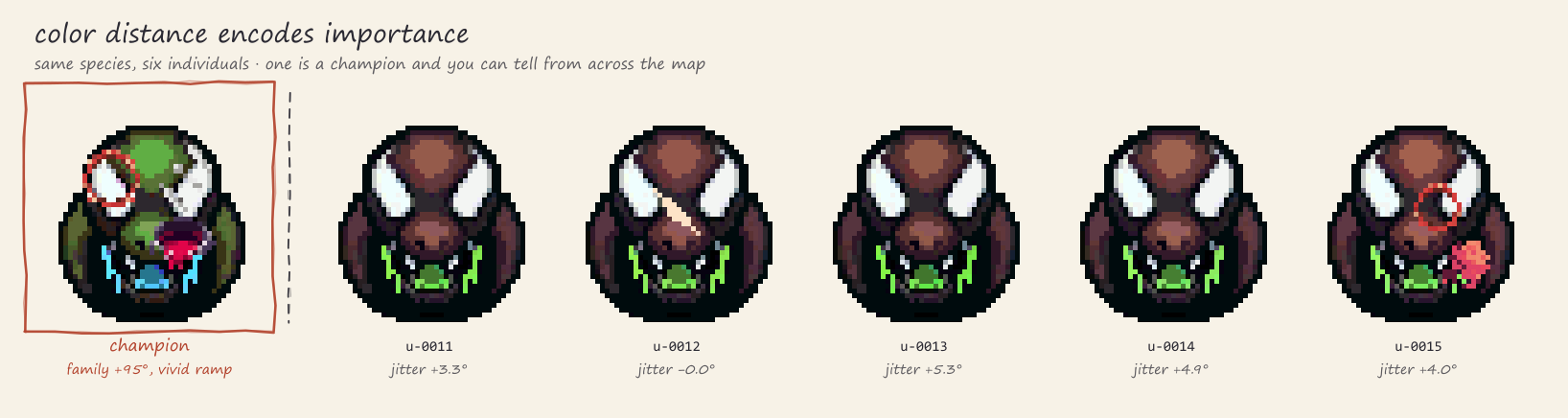
There are two consumers of the compositor, and the difference between them is a deliberate piece of visual grammar. Champions, the named rivals you build feuds with, draw their hue from a small authored set of six families: -60, -32, 0, 22, 48, and 95 degrees, plus one of 4 saturation/lightness ramps. Those are big, readable shifts. A champion in the 95-degree family is recognizable across a battlefield.
Regular roster units get jitter, not families: plus or minus 4 degrees of hue for an on-spec hatch, widening with genetic variance up to a maximum of plus or minus 11.2 degrees for the freakiest possible egg, with saturation wobbling within 8 percent and lightness within 5 percent. So the worst-case unit drift is still smaller than the smallest champion family offset. That is the rule: color distance encodes narrative importance. A glance at a unit card should say “skitter” before it says “which skitter”, and a champion should never be mistakable for a regular.
The champion hue pick also carries a constraint straight from devlog #3: it must stay the
first draw of mulberry32(hash32(seed)), frozen forever, because players learn their rivals
by color. When I later added the tone ramps, they got their own forked stream (the seed with
|tone appended) precisely so the new feature could not re-roll anyone’s established hue.
The roster units likewise prefix their seed with unit| so a champion id reused in a display
context never accidentally mirrors the champion’s accent.
The pipeline that makes the base art, sharp edges included
Everything the compositor builds on, the base portraits, icons, scene art, and combat
animation clips, is generated through PixelLab and wired into the repo by scripts. There are
currently 56 .mjs scripts in scripts/, with names like generate-icon-sizes.mjs (bakes
the 16, 24, and 48 pixel sizes every icon ships in), build-pixellab-manifest.mjs,
download-skill-icons-pixellab.mjs, and, relevantly for this post,
download-champion-scar-decals.mjs, which fetched the scar atlas. The result of all of it is
7,353 PNGs under src/assets/ right now.
It is not a magic art department. The failure I want to put on the record is death animations. Twice I prompted a death clip where the creature dissolves away by the final frame, and the generation job silently died, both times: no error, no pending job, just nothing. Other death prompts came back as loops that end on the standing pose, which in-game means the dead unit holds its last frame and looks perfectly healthy. I did not fix this by fighting the generator. I fixed it by adopting one known-good prompt template, a falling-backward death, and using it everywhere. When a tool has sharp edges, you do not file the edges, you learn where they are.
That is the honest framing of the whole AI art question for this project. It is a tool with failure modes, a review step, and a pile of wiring scripts around it, and it is also the single reason a one-person game can have 45 species with portraits, icons, and animation clips at all. Both things are true at once.
Side note: you might ask why I composite at runtime instead of pre-baking the variants into PNGs. Storage math. Champions alone have 6 hue families times 4 tone ramps, which is 24 accent combinations per species, times 45 species, times 3 icon sizes: 3,240 PNGs before placing a single scar, and scar positions are sampled per individual, so the full space is not enumerable at all. The runtime version is one base set plus two seeded functions that fit in 20 lines, and each individual bakes once and is served from cache forever after.
As always, let me know what you think.