Hello, this week is about the part of this project I am least qualified for: drawing. Mutarch is a pixel-art game, I am the only person on it, and I cannot draw. Not “being modest” cannot draw. My lines wobble, my shapes lean, and my shading looks like weather. This post is about how the game gets small pixel art anyway, and about the homework that turned my bad art from a mystery into a list of named mistakes.
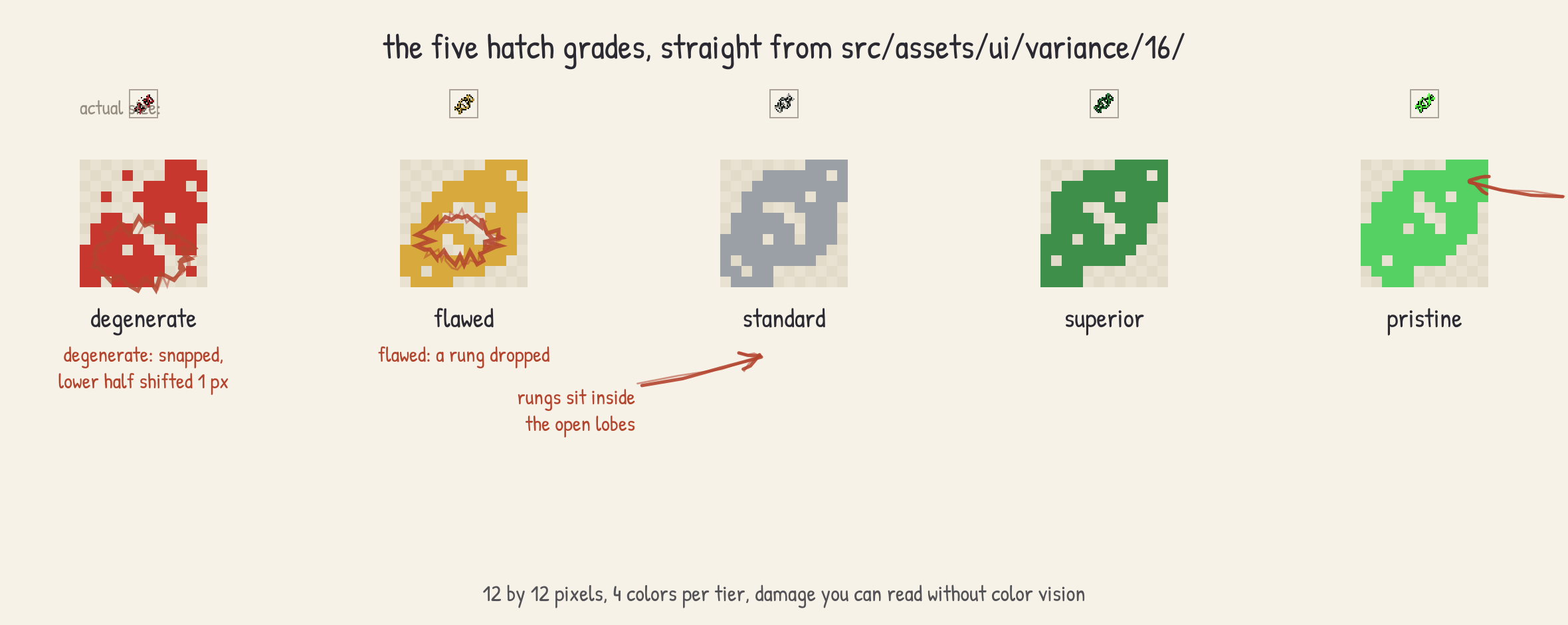
The trigger was hatch grades. Every creature that hatches in Mutarch gets a quality grade, one of five (degenerate, flawed, standard, superior, pristine; what those do to stats is a story for another week), and the unit card needs a glyph that says which one at a glance. The slot on the card is 16 pixels. That sentence is the entire design constraint, and my first attempt did not respect a single pixel of it.
The glyph that committed every sin at once
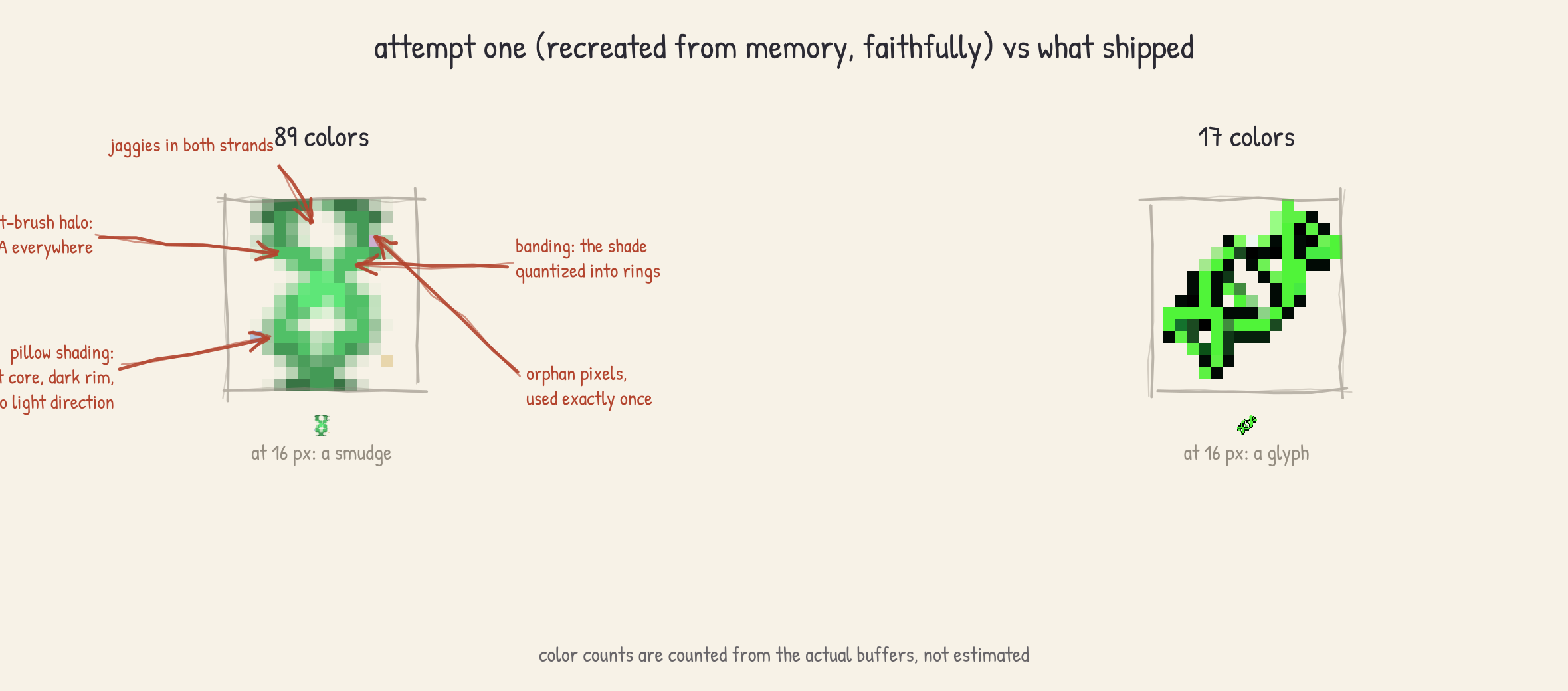
Attempt one was the naive one. I opened an art program, zoomed to 800 percent, and drew a little double helix freehand with the mouse, because the grades are genetic and a helix says genetics. I shaded it with a soft brush, picked new colors whenever the current one looked wrong, and kept going until it looked decent at 800 percent. Then I zoomed out to actual size, and at 16 pixels it was a smudge. Five smudges, one per tier, distinguishable from each other only by average color, and from a rendering artifact not at all.
Three evenings of tutorials later (Pedro Medeiros’s pixel art series and Derek Yu’s page on common mistakes are the canonical reads, and I recommend both), I could at least name what I had done. Pixel art has a precise vocabulary for bad: jaggies, uneven staircase steps in a line that is supposed to read as smooth. Banding, parallel strips of color that hug each other and flatten the form into cardboard. Pillow shading, shadows that follow the outline inward with no committed light direction, so the object glows instead of sitting in space. My helix had all three at once, plus a few dozen orphan pixels of colors used exactly once, courtesy of the soft brush.
The positive vocabulary was the more useful half. Good pixel art is built from clusters, deliberate groups of same-color pixels, not from strokes. Colors come in short ramps of 3 or 4 values per material, and the hue drifts as the value changes, shadows cooler and highlights warmer, instead of just getting darker. Anti-aliasing is placed pixel by pixel, by hand, only where it buys readability. The summary that stuck with me: at this scale you are not making a small painting, you are doing typesetting. Nobody freehands a font.
144 pixels are 144 decisions
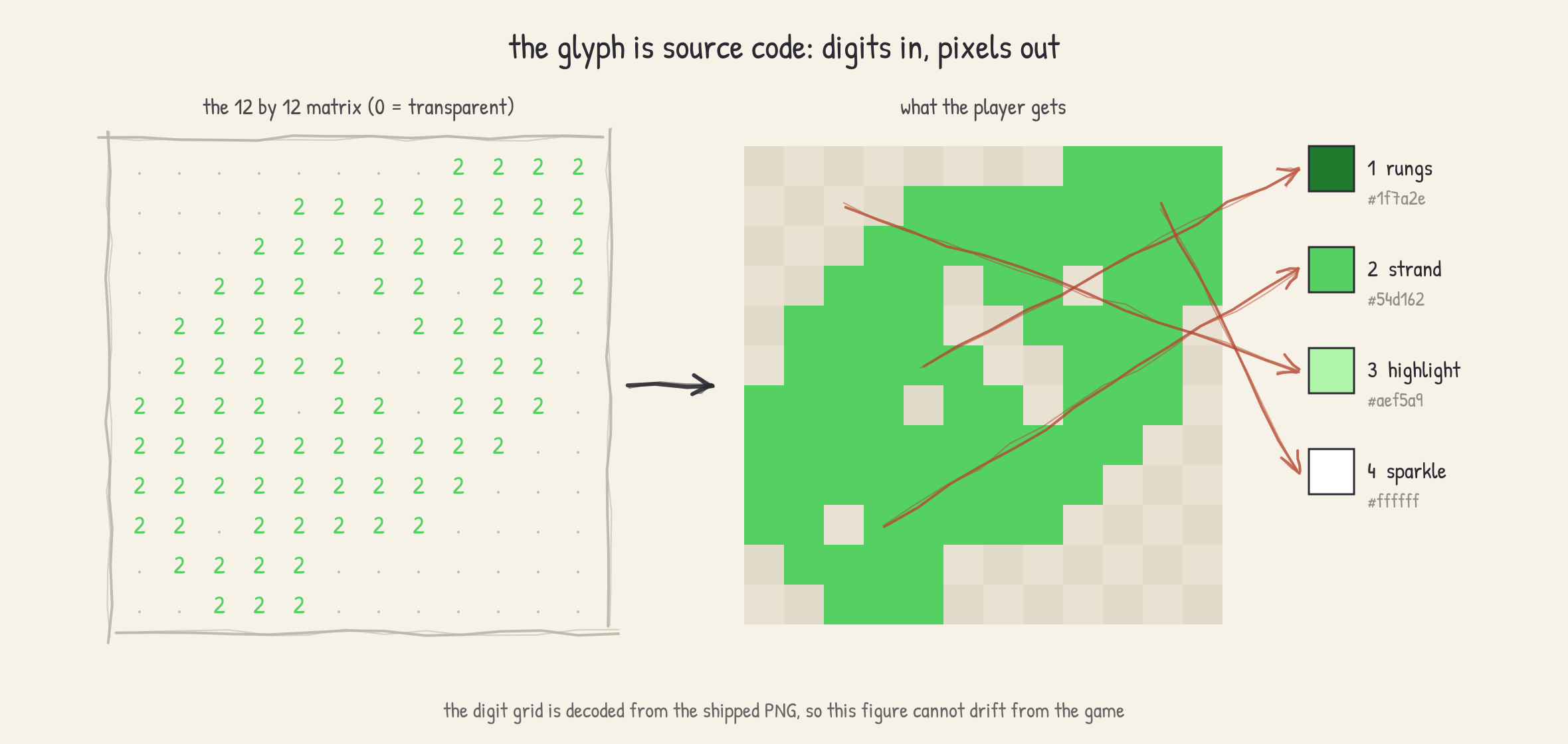
A 12 by 12 glyph has 144 pixels, and after the homework I understood that every one of them is a decision. Decisions are the one thing I can do all day, as long as I get to make them with a keyboard. So I stopped drawing the glyph and started typing it: the shipped variance glyphs are authored as a pixel matrix in source, and the helix is two arrays of strand x-positions per row:
const STRAND_A = [2, 3, 4, 5, 6, 7, 8, 7, 6, 5, 4, 3];
const STRAND_B = [8, 7, 6, 5, 4, 3, 2, 3, 4, 5, 6, 7];
The strands cross at rows 3 and 9, which gives two open lobes, and the base-pair rungs are
drawn inside the lobes. The first version put rungs at the end rows too, and the result read
as an hourglass, which is a very specific bug to have in an array. Each tier gets a palette
of exactly 4 colors: a dark for the rungs, a strand base, a highlight for the top pixels,
and white, which only the pristine tier is allowed to use, for a single sparkle pixel. The
pristine ramp is #1f7a2e, #54d162, #aef5a9, dark to light, and the hue drifts on the
way up, which I would love to claim as craft but is honestly just rule-following.
The damage tiers get shape cues instead of more color: flawed drops one rung and knocks one pixel out of a strand, and degenerate snaps the helix entirely, with the lower fragment shifted a pixel sideways. Color-only coding fails for color-blind players and fails for everyone at arm’s length, and a missing rung survives both.
I will not pretend the process was elegant. It was: change a digit, rerender, squint, change it back. I am sloppy in an art program and I was sloppy here too, the difference is that a matrix in a text editor diffs, so my sloppiness is at least version-controlled.
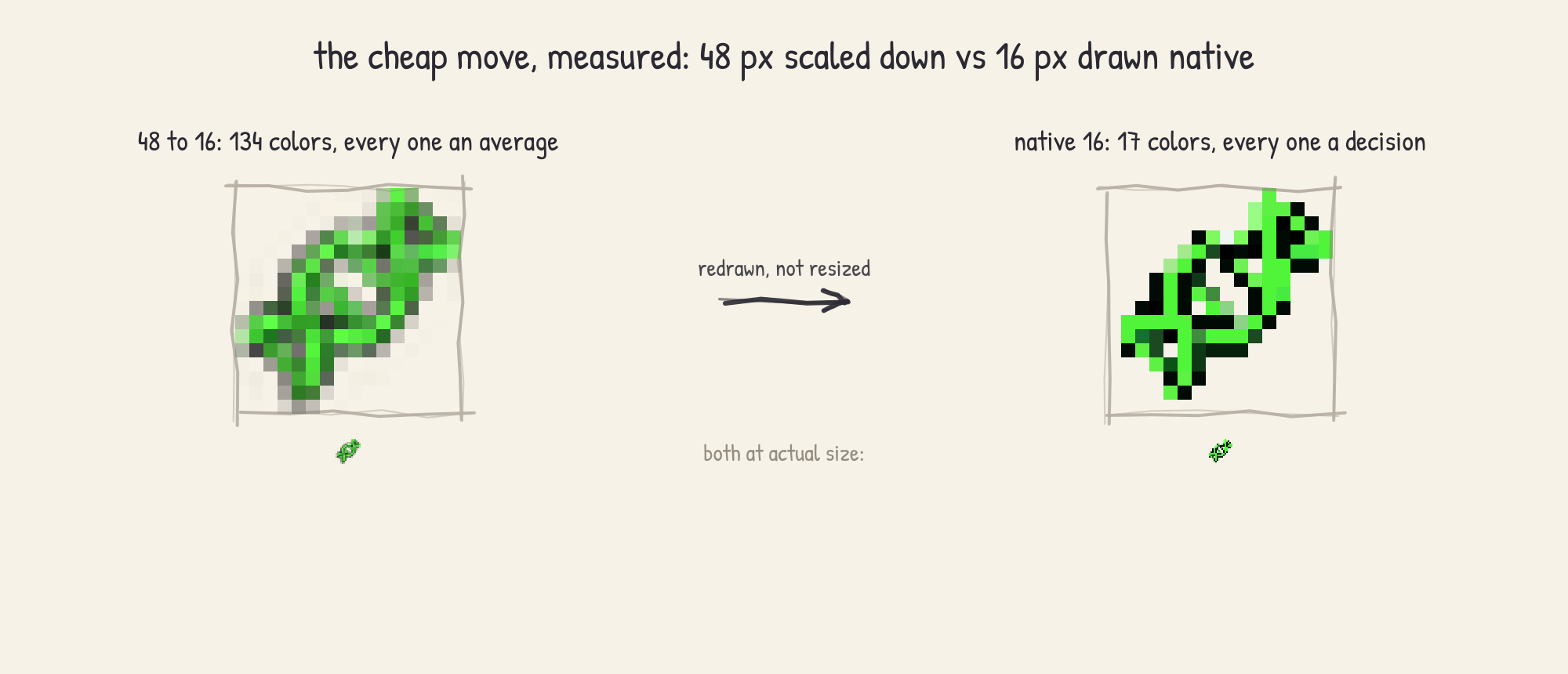
Scaling was its own lesson, learned through the obvious failure first. The Atlas dossier
screen shows the glyph at 48 pixels, and the cheap move was to draw once at 48 and scale
down. At 16 pixels the result was the original smudge problem all over again: a 3x reduction
averages every surviving pixel from 9 source pixels, and averaging is the exact opposite of
deciding. So the small sizes are native: 16 px is the 12 by 12 matrix placed 1:1 with a 2 px
margin, 24 px is exactly that doubled with nearest neighbor, and nothing in the pipeline
ever scales by a fractional factor. The same ladder applies game-wide: every icon ships in
16, 24, and 48 via scripts/generate-icon-sizes.mjs, nearest neighbor only, integer factors
only.
Ground painted with a seeded dice roll
The colony screen needed terrain, and after the glyph experience I skipped the art program
entirely. The ground is painted pixel by pixel in code, in colonyGroundArt.ts under
src/ui/features/base/, in the same spirit as the region map renderer from #2: one buffer,
every pixel placed by a loop. The map is 44 by 34 cells, each cell is 8 art pixels on a
side, and art pixels are blown up 3x to 24 world pixels, so the chunkiness is a choice
rather than a confession.
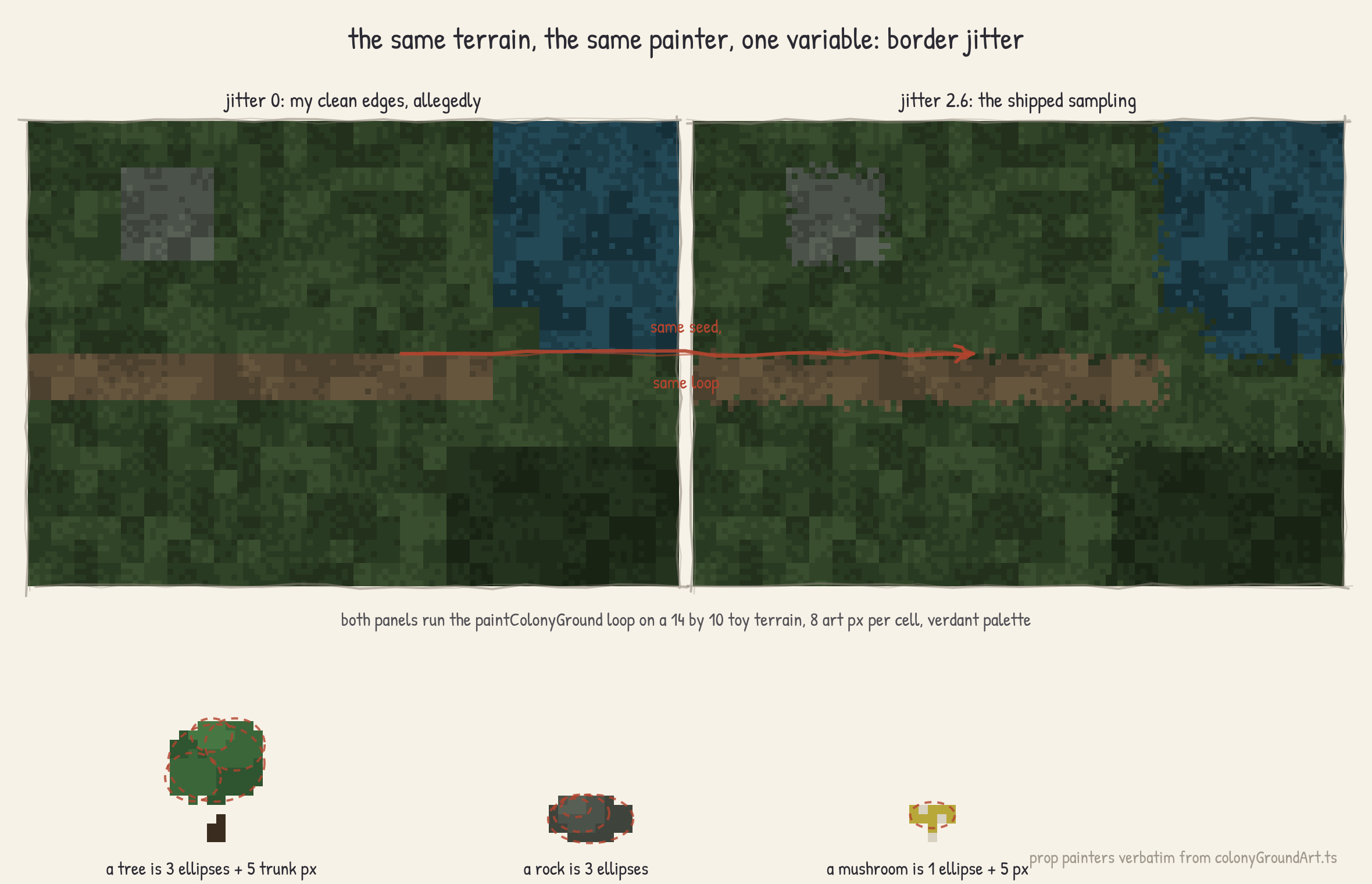
Each material is a ramp of 3 or 4 colors (open ground, rough wilds, path, rock, water, canopy), with one palette per clan theme, 6 in total. The part I want to be honest about is the borders. When I tried to author clean edges between materials, they had exactly the jaggies problem from section one, except now at terrain scale. The fix was to stop drawing edges at all: where two materials meet, each art pixel rolls a jittered sample to decide which side it belongs to, so every border comes out dithered and organic. Seeded, of course, the #3 habits run deep. I could not draw a clean edge, so I arranged for the game to not contain any.
The scatter props are the same trick smaller: a tree is a trunk plus three stacked ellipses, 13 by 18 art pixels, a rock is three overlapping ellipses at 10 by 7, a mushroom is a stem and a disk at 6 by 6. I still cannot draw a tree. I can specify three ellipses that average out to one, and on a 24-inch monitor nobody can tell which of us did it.
Small things
The custom cursors are 32 px sprites, and the actual lesson there was not the drawing (an
arrow is the one shape I can manage), it was the hotspot. The first build had the click
point a few pixels into the arrow’s body, and every click landed just beside what you were
pointing at. It felt like input lag and profiled as nothing. The shipped hotspots are
calibrated per cursor: default at (7, 2), point at (8, 1), grab at (6, 3), all in
gameChrome.css.
And one number I am unreasonably pleased by: the five 16 px glyphs together weigh about 2 KB. The icon set that took me the longest to get right is the smallest art in the game.
Creature art is the obvious open question, because no amount of helix arrays will draw 45 species. That problem needs a completely different answer, and it gets its own post.
As always, let me know what you think.